
Practice Management Software Pricing: What It Really Costs
If you have started shopping for tools to organize your practice routine, you have probably noticed the pricing pages get confusing fast. Some apps charge a flat fee, others bill monthly, and a few dangle a free tier that barely does anything useful. Practice management software pricing ranges from completely free to $15 or more per month, and the number you actually pay depends heavily on what features you need and how you practice.
This article breaks down what drives those price differences, from basic habit trackers with reminders to platforms that use spaced repetition algorithms to schedule exactly what you should work on and when. We compare typical price tiers across the market, explain which features justify a higher cost, and point out where you can get real value for free during beta periods or limited trials.
We built MemoRep because musicians and skill learners kept asking the same question: why pay for software that just logs sessions instead of telling you what to practice next? So beyond the raw numbers, you will get a clear framework for judging whether a subscription price matches the actual scheduling intelligence you are buying, not just a calendar with a nicer interface.
Why practice management software pricing varies so widely
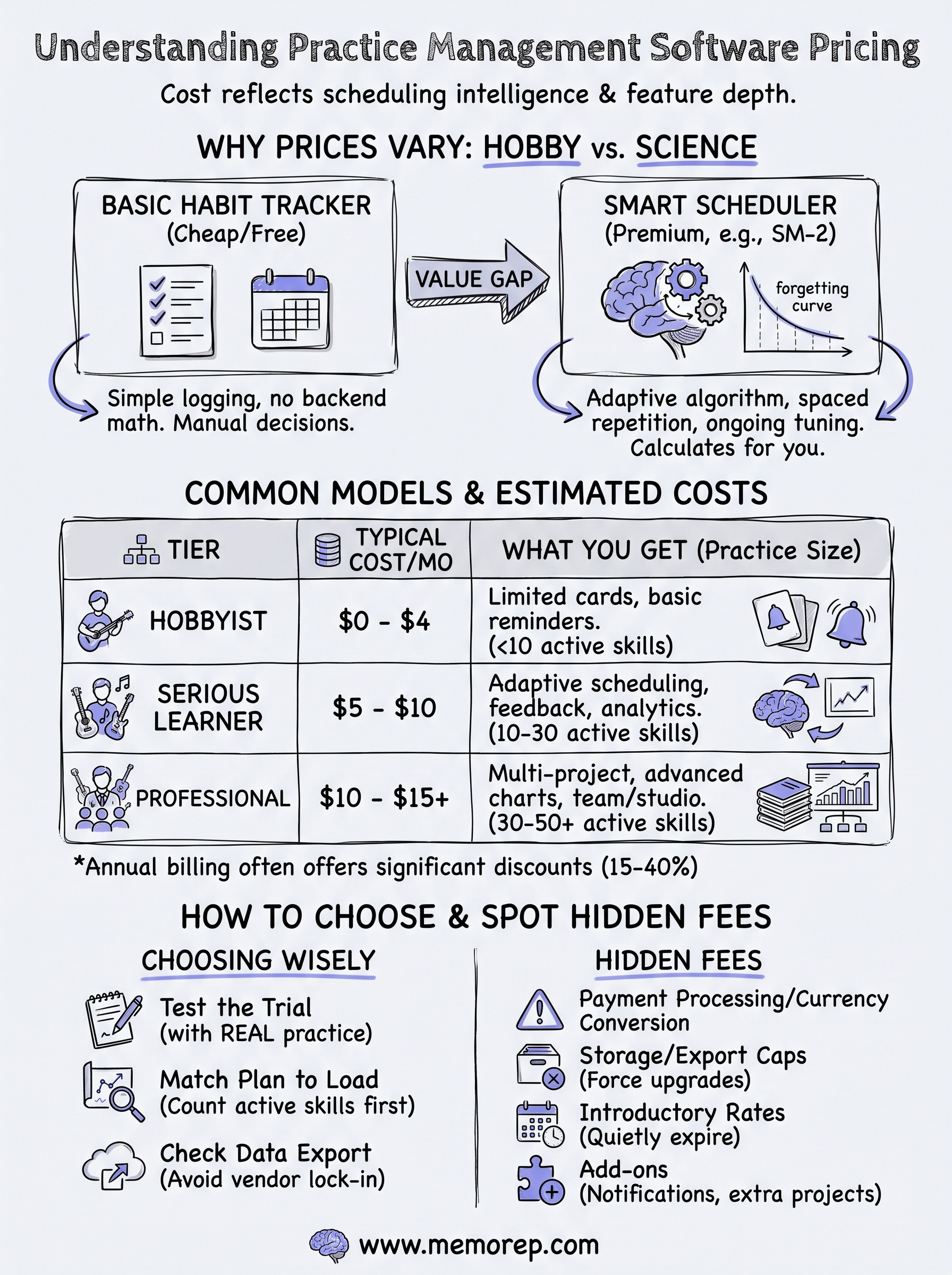
A basic habit tracker and a true spaced repetition engine solve completely different problems, and that gap explains most of the price spread you see across the market. A $2 monthly app that just logs "practiced guitar today" needs almost no backend logic. A platform that calculates your personal forgetting curve, adjusts intervals based on how well you performed a passage, and reschedules dozens of skills automatically requires real engineering investment, ongoing algorithm tuning, and server infrastructure that scales with every user's history. You are not just paying for a prettier interface; you are paying for the math running behind it.
The scheduling algorithm drives the cost
Building and maintaining a working implementation of the SuperMemo SM-2 algorithm or a custom variant of the Ebbinghaus forgetting curve is not trivial. Developers have to test the model against real practice data, adjust for different skill types, and keep it accurate as users log thousands of Again/Hard/Good/Easy ratings. That kind of ongoing refinement costs money, and companies pass some of it along through subscription fees rather than one-time purchases.
The price of practice software usually reflects how much thinking it does for you, not how many buttons it has.
Niche focus versus mass-market flash-card tools
Most of the well-known spaced repetition apps were built for language learning or exam prep, where the unit of practice is a flash card with text on both sides. Adapting that same engine for practical skills like scales, repertoire passages, or physical technique takes extra development work, because you need to track qualitative feedback instead of a simple right-or-wrong answer. Tools built specifically for musicians and skill practitioners often charge more per user because they serve a smaller, more specialized audience and cannot spread development costs across millions of casual users the way a general flash-card app can.
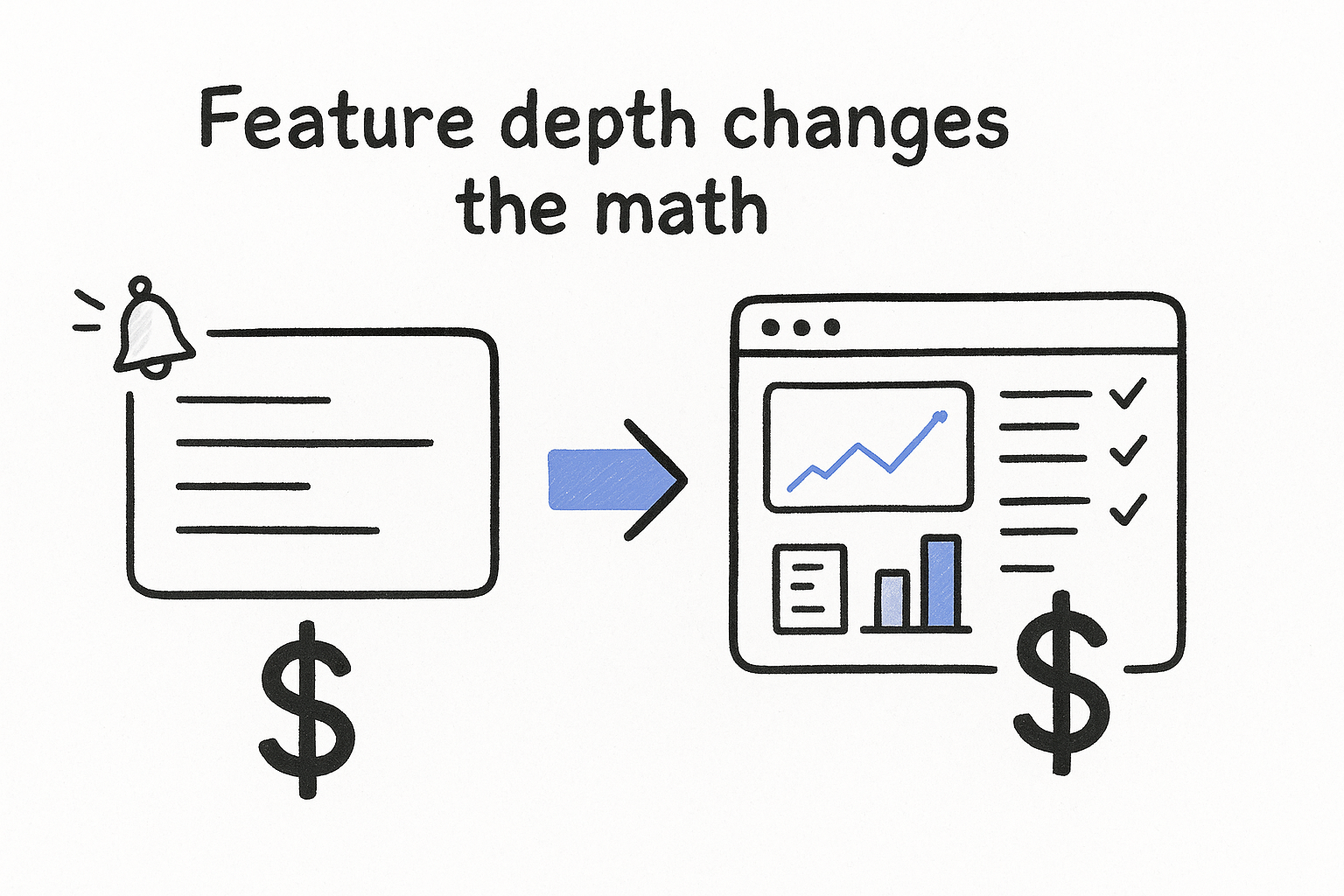
Feature depth changes the math
Notifications, progress charts, project organization, and multi-instrument support all add engineering and support overhead, and each one nudges the price up. A stripped-down app with a single practice list costs less to run than a platform tracking multiple projects, adaptive difficulty, and detailed visualizations of your improvement over months. Here is a rough breakdown of what typically separates cheap tools from pricier ones:
| Feature | Basic/free tools | Premium scheduling platforms |
|---|---|---|
| Practice logging | Yes | Yes |
| Reminder notifications | Sometimes | Usually included |
| Adaptive spaced repetition scheduling | Rarely | Core feature |
| Feedback-driven difficulty adjustment | No | Yes |
| Progress visualization | Basic streak counter | Detailed trend charts |
| Multi-project organization | Limited | Full support |
Business model and audience size matter too
Smaller companies serving a focused niche, like musicians, often can't rely on advertising or massive scale to subsidize a free product, so they charge subscriptions that reflect real development and support costs. Larger consumer apps with millions of users can afford a generous free tier because a small percentage converting to paid still generates enough revenue. Pricing also shifts depending on whether a company is still in beta or early access, when founders frequently offer premium features free or at a discount to gather feedback and build a user base before settling on a permanent price.
Support and updates cost something
Ongoing customer support, bug fixes, and new feature development don't happen for free, and companies that actually respond to feedback and ship improvements tend to charge more than apps that were built once and left alone. If you notice a tool with an unusually low price and no recent updates, that's often a sign the developer has stopped actively maintaining it. Weighing that tradeoff matters just as much as comparing raw monthly fees, because a cheap subscription tied to an abandoned product isn't actually cheaper in the long run if the scheduling logic never improves or bugs never get fixed.
How to estimate your total software costs
Sticker price on a pricing page rarely matches what you actually pay after a few months. Before you commit to any tool, walk through your own practice habits and figure out which tier you genuinely need, because most people either overpay for features they never touch or get stuck upgrading mid-year once they hit a free plan's limits. Start by counting how many separate skills, songs, or techniques you juggle at once. A single practice list might stay free forever, but a real repertoire spanning dozens of pieces usually pushes you into a paid tier fast.
Map your practice complexity to a plan
Grab a notebook or spreadsheet and list every skill, exercise, or piece you actively rotate through practice sessions right now. Then check that number against each app's free tier limits, since most free plans cap you at a small number of active cards or projects before asking you to pay. If you already manage 20 or more distinct practice items, budget for a paid tier from day one instead of assuming you'll stay under the free limit.
Count your active skills before you compare prices, because the free tier that works for a hobbyist rarely survives a serious practice load.
Factor in the billing cycle discount
Most subscription software offers a meaningful discount for paying annually instead of monthly, often somewhere between 15 and 40 percent off the monthly rate. Run the math both ways before you decide, since a $9 monthly plan that drops to $6 equivalent when billed yearly saves you roughly $36 a year, real money if you're comparing several tools side by side. Here's a simple way to compare two competing plans over a 12-month period:
Annual cost = (monthly price x 12) for month-to-month billing
Annual cost = annual price paid upfront for yearly billing
Savings = (monthly price x 12) - annual price
Account for family or multi-instrument use
If you play more than one instrument, teach students, or share an account with a family member, check whether the app charges per project, per instrument, or per seat. Some platforms bundle unlimited project organization under one subscription, while others charge extra for each additional instrument you track, which can quietly double your monthly bill. Ask this question before signing up, not after your card gets charged a second time.
Don't forget the trial-to-paid transition
Beta programs and free trials feel great until they end, so mark your calendar for whenever a free period expires and decide in advance whether you'll pay or switch tools. Companies running limited beta programs, MemoRep included, sometimes offer premium access free to early users, but that window closes once the program fills up or matures into a standard pricing model. Treat any free beta period as a real trial run rather than a permanent deal, and use that time to judge whether the scheduling accuracy actually improves your practice before a bill shows up.
Common pricing models explained
Once you understand why prices vary, the next step is recognizing which billing structure a given tool actually uses, because the label on a pricing page can hide very different cost realities. Vendors mix and match these models constantly, and two apps charging "$8 a month" can still deliver wildly different value depending on what that fee unlocks. Knowing the common patterns helps you spot which one fits your practice habits instead of guessing based on the sticker price alone.
Freemium with a paid upgrade
Freemium remains the most common structure among practice management software vendors, offering a limited free tier alongside a paid plan that removes caps on projects, cards, or notifications. The free version usually works fine for someone practicing one instrument with a handful of exercises, but it starts to feel restrictive the moment you add a second project or want detailed progress charts. Watch for artificial limits designed to nudge you toward upgrading, like a cap on active practice items or a delay before reminders unlock.
Flat monthly or annual subscription
A flat subscription charges one price for full access, regardless of how many skills or projects you track, and it's the model most closely tied to ongoing algorithm development. Annual billing almost always beats paying month to month, since providers reward the upfront commitment with a lower effective rate.
A flat subscription rewards you for using the tool heavily, since the price stays the same whether you track three skills or thirty.
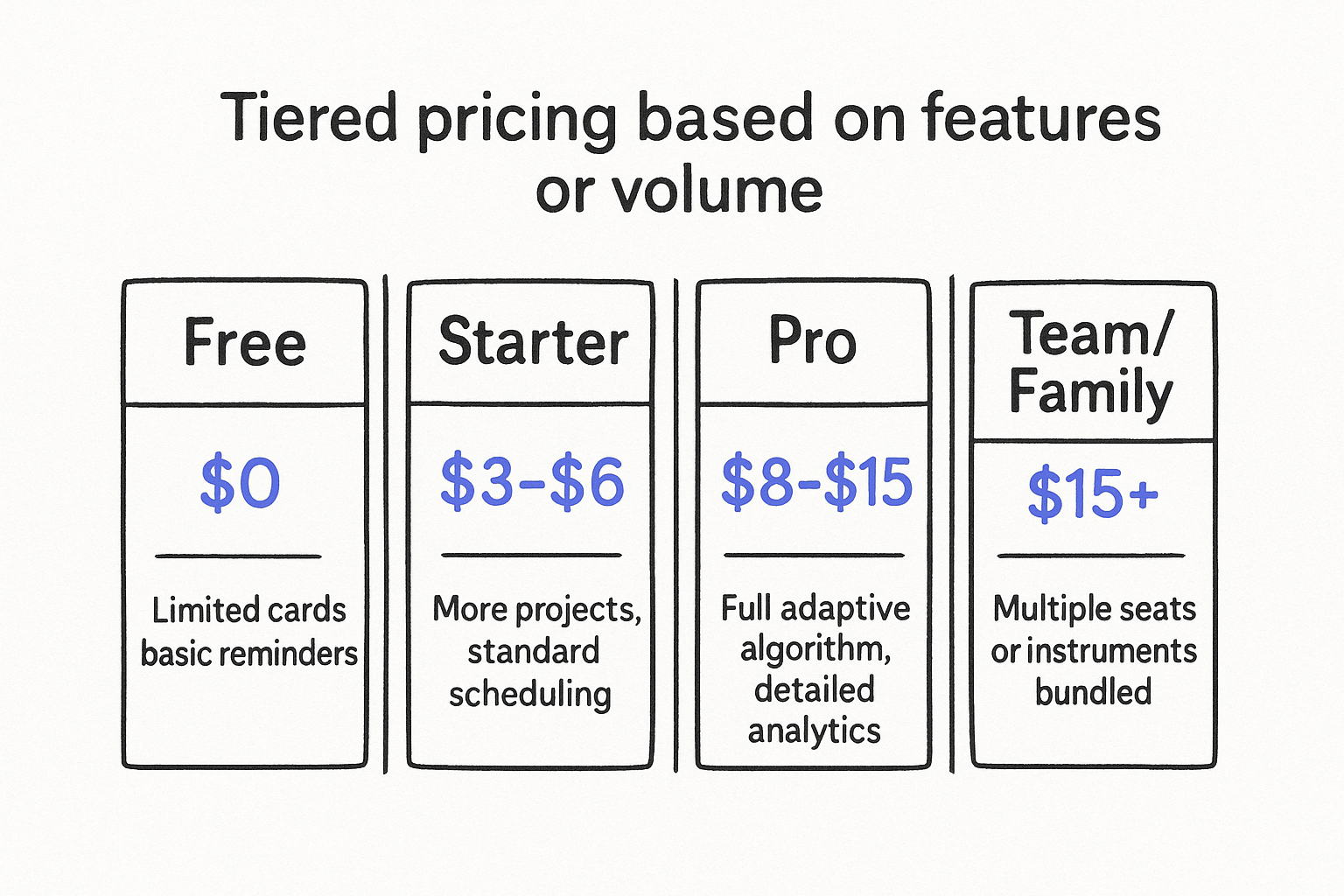
Tiered pricing based on features or volume
Tiered plans stack multiple price points, each unlocking more capacity or more advanced scheduling features. A typical structure looks something like this:
| Tier | Typical monthly cost | What you usually get |
|---|---|---|
| Free | $0 | Limited cards, basic reminders |
| Starter | $3-$6 | More projects, standard scheduling |
| Pro | $8-$15 | Full adaptive algorithm, detailed analytics |
| Team/Family | $15+ | Multiple seats or instruments bundled |
Compare each tier against your actual practice load rather than jumping straight to the top plan, since paying for a Team tier when you practice solo wastes money every month.
One-time purchase or lifetime license
A smaller number of apps still sell a one-time license instead of a recurring subscription, appealing to users who dislike ongoing bills. This model works best for simple logging tools, but be cautious with anything claiming adaptive scheduling, because a static one-time purchase rarely funds the continuous algorithm tuning that real spaced repetition requires over years of use.
Per-seat or per-instrument charges
Finally, some platforms bill per user or per instrument rather than per account, which matters if you teach, share practice tracking with family, or juggle multiple instruments yourself. Read the fine print before signing up, since a plan advertised at a low base price can multiply quickly once you add each additional seat or instrument tracked separately.
Typical price ranges by practice size
Practice size shapes your bill more than any other single factor, since a hobbyist rotating through five exercises has completely different needs than a working musician managing forty pieces across three instruments. Comparing raw dollar amounts across vendors only helps once you match those numbers against your own practice scope, because a $10 monthly plan that feels expensive for a casual player often looks cheap for someone teaching students or juggling a full repertoire. Use the ranges below as a starting budget, then adjust based on how many skills you actually track.
Solo hobbyist with a light routine
Someone practicing one instrument with fewer than ten active skills or pieces usually stays inside a free tier or pays very little, often between $0 and $4 a month. At this scale, basic reminders and simple logging cover most needs, and the adaptive scheduling upgrade matters less because manual tracking is still manageable. Beta programs, including MemoRep's current free access for early users, fit perfectly here since the practice load is small enough that any limitations rarely get noticed.
Serious learner managing a growing repertoire
Once your active list crosses roughly ten to thirty items, whether that's scales, technique drills, or full pieces, most people land in the $5 to $10 monthly range for a paid tier with real spaced repetition scheduling. This is where the scheduling algorithm starts earning its keep, since manually remembering which of thirty passages needs review today becomes genuinely difficult without automated prompts.
The more skills you juggle, the more a smart scheduler saves you, which is exactly why mid-size practice loads justify a paid plan.
Multi-instrument or professional practice
Musicians tracking multiple instruments, teaching a full studio, or managing forty-plus pieces typically pay $10 to $15 or more per month, especially if the platform charges per instrument or per project bundle. At this volume, detailed progress visualization and adaptive difficulty adjustments stop being a nice extra and start functioning as a real time-saving tool, since the alternative is hours of manual spreadsheet tracking every week.
Here's a quick reference for how practice size typically maps to monthly cost:
| Practice size | Active skills tracked | Typical monthly cost |
|---|---|---|
| Solo hobbyist | Under 10 | $0-$4 |
| Serious learner | 10-30 | $5-$10 |
| Multi-instrument/professional | 30-50+ | $10-$15 |
| Teaching studio or family | Multiple seats | $15-$30+ |
Teaching studios and shared accounts
Vendors billing per seat or per student push costs well past $15 a month once you add several accounts under one subscription, so teachers should ask upfront whether pricing scales linearly or offers a studio discount. Reference the U.S. Small Business Administration's guidance on budgeting for software costs if you're running a teaching studio as a business and need to plan recurring software expenses alongside other overhead.
Hidden fees that inflate your quote
The number on a pricing page rarely matches what actually hits your card each month. Add-on fees, currency conversion charges, and quietly expiring discounts can push a $6 plan closer to $12 without any obvious warning, and most people only notice after checking their bank statement. Reading the fine print before you sign up saves you from an unpleasant surprise three billing cycles later.
Payment processing and currency conversion
Some vendors advertise prices in US dollars but bill through a payment processor that adds a currency conversion fee if your card is issued in another country. That fee typically runs 1 to 3 percent per transaction, small on its own but noticeable over a year of monthly charges. Check whether the listed price already includes tax, since some regions require software subscriptions to carry VAT or sales tax added at checkout rather than baked into the sticker price.
Storage or export limits that force an upgrade
A surprising number of tools cap how much practice history you can store or export on a free or entry-level plan, then charge extra once you hit that ceiling. You might not notice this limit until months into using the app, right when your practice log becomes genuinely useful, and suddenly you're forced into a pricier tier just to keep your own data accessible.
The real cost of a plan often shows up only after you've built enough history to depend on it.
Introductory pricing that quietly expires
Many subscriptions lure new users with a discounted introductory rate for the first three or six months, then renew automatically at the full price with little more than a small note buried in the terms. Set a calendar reminder for whenever that discount period ends so you can decide, with a clear head, whether the full price still makes sense for your practice routine.
Add-on features billed separately
Core scheduling might come with your base subscription, but extras like advanced analytics, calendar integrations, or extra reminder channels sometimes carry a separate charge. Before you commit, run through this checklist:
- Does the base price include adaptive scheduling, or is that a paid add-on?
- Are notifications (email, push, SMS) included, or billed per channel?
- Is there a fee for exporting your practice history?
- Does adding a second instrument or project cost extra?
- Will the price increase automatically after a trial or introductory period?
Cancellation friction and refund policies
Finally, check how easy it actually is to cancel. Some apps require you to email support or navigate several confirmation screens designed to delay cancellation long enough to bill you for another month. Look for a clear refund policy and a straightforward cancel button inside account settings before you hand over payment details, since a vendor that hides the exit is usually hiding something about the true cost too.
How to compare quotes and pick the right plan
Once you have gathered a few quotes, resist the urge to just rank them by monthly price. Two plans priced at $8 can differ wildly in what they actually schedule for you, so line up the features side by side before you look at the dollar amount at all. Treat every quote as a bundle of specific capabilities, not a single number, and you will avoid the common trap of picking the cheapest option only to hit a wall of limitations two months in.
Build a like-for-like comparison table
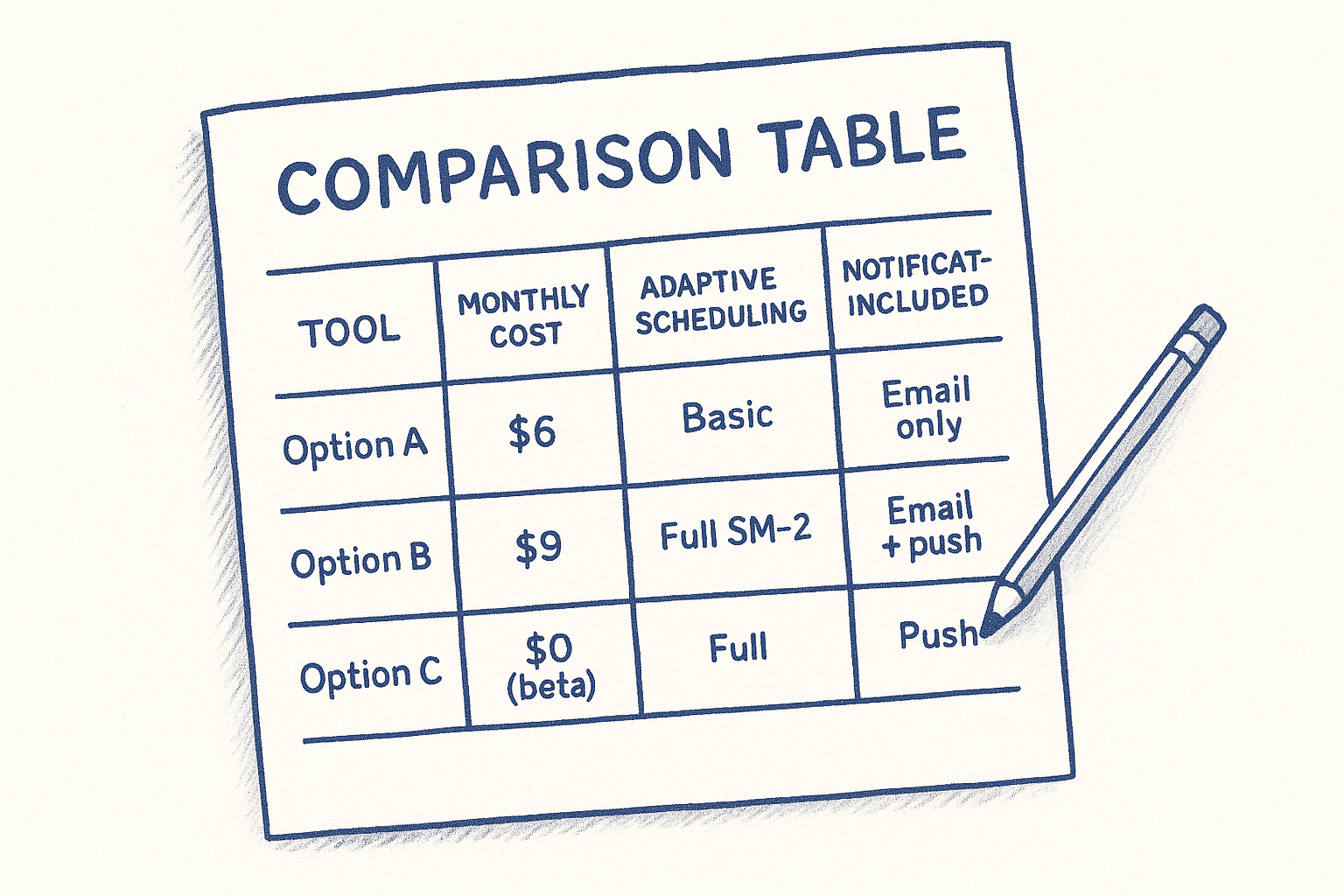
Write down each candidate's price, billing cycle, and the exact features included at that tier, since vendors rarely present this information the same way. A simple table you build yourself often reveals more than the marketing page:
| Tool | Monthly cost | Adaptive scheduling | Project limit | Notifications included |
|---|---|---|---|---|
| Option A | $6 | Basic | 5 | Email only |
| Option B | $9 | Full SM-2 style | Unlimited | Email + push |
| Option C | $0 (beta) | Full | Unlimited | Push |
Laying the numbers out this way makes it obvious when a slightly pricier plan actually delivers more real scheduling intelligence per dollar.
Test the free trial like it's the paid product
Never judge a tool by its landing page alone. Sign up for the free tier or trial and actually log a week of real practice sessions, rating your performance honestly with whatever feedback system it offers. Real usage exposes problems that a features list never will, like clunky reminder timing or a scheduling algorithm that reshuffles your priorities in ways that don't match how you actually improve.
The only quote that matters is the one you've tested against a real week of practice, not the one that reads best on paper.
Match the plan to your practice, not the other way around
Go back to the practice complexity you mapped out earlier, your active skill count, your instrument count, and whether you share the account, and pick the tier that covers that exact scope with a little room to grow. Upgrading later is almost always painless, while downgrading after locking in a year of annual billing rarely is, so lean toward the smaller tier when you're unsure rather than overcommitting upfront.
Ask about data portability before you sign
Before entering payment details, confirm you can export your practice history if you ever switch tools. A vendor lock-in situation, where your scheduling data lives only inside one app with no export option, costs you far more in the long run than a few extra dollars a month ever would. Reasonable companies make this easy; ones that hide the export option are telling you something about how they view your data.
Weigh beta access against long-term pricing
If a tool, including MemoRep, currently offers free premium access as part of a limited beta program, factor in what the price will likely become once that period ends. Locking in feedback-driven improvements now while the cost is zero can be worth the tradeoff, as long as you go in expecting a standard subscription price eventually.
Making sense of the price tag
At the end of the day, practice management software pricing comes down to one question: how much scheduling intelligence are you actually buying? A cheap logging app and a real spaced repetition engine solve different problems, and the price gap between them reflects that difference honestly. Match the tier to your actual practice load, watch for hidden fees that inflate a clean-looking quote, and test any tool against a real week of practice before you trust the marketing page.
Don't pay for features you'll never touch, and don't settle for a free tool that leaves you guessing what to practice next. If you want to see how a science-backed scheduling algorithm actually works before comparing it against a price tag, check out the science behind MemoRep, then decide for yourself whether it earns a spot in your routine.