9 Best Spaced Repetition Apps to Study and Memorize Faster
Most spaced repetition apps on the market were built for one thing: flashcards. Vocabulary lists, anatomy terms, bar exam facts. That works fine if you're memorizing text, but it falls apart the moment you're trying to keep a repertoire of songs sharp, maintain a set of climbing techniques, or hold onto a dozen coding patterns you only touch once a month.
If you're searching for the best spaced repetition app, you're probably trying to solve a specific problem: skills you learned a while back are getting rusty, and you have no system for deciding what to revisit and when. The right app should schedule your review sessions automatically, based on how well you actually performed last time, not just show you a card and ask you to rate it.
This list covers nine tools worth trying in 2026, from classic spaced repetition system apps built for text memorization to newer platforms designed around real practice sessions. We'll break down who each one fits best, what makes its scheduling algorithm distinct, and where the free tiers stop being useful, so you can pick the one that matches how you actually practice, not just how you memorize.
1. MemoRep for musicians and practical skill practice
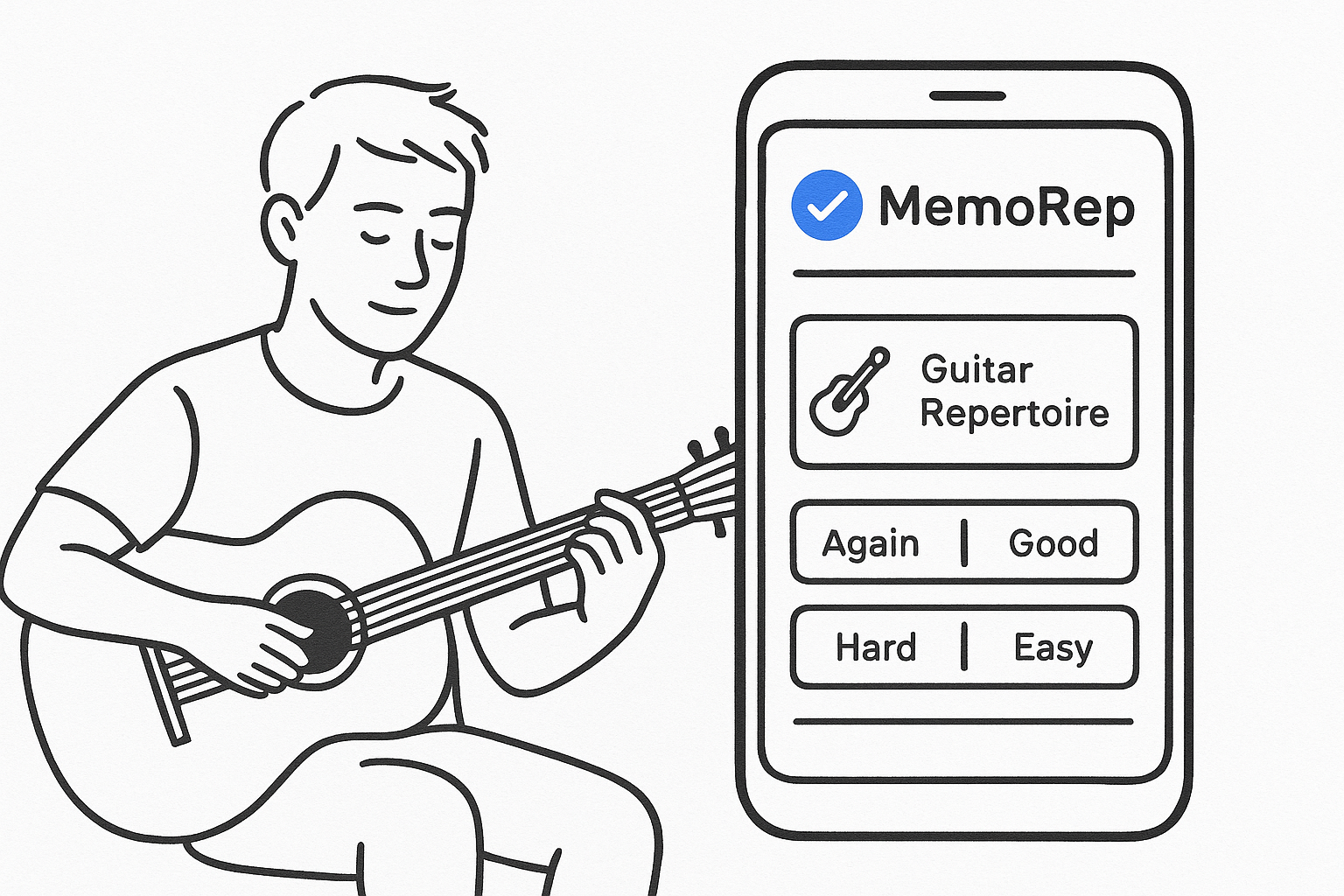
MemoRep takes a different approach than most spaced repetition apps, because it wasn't built for flashcards at all. It was built for people who need to keep a physical or practical skill sharp: musicians maintaining a repertoire, climbers drilling technique, coders holding onto patterns they use once a month. Instead of showing you a card and asking you to recall a fact, MemoRep tracks practice items you define yourself, whether that's a song, a scale, a drill, or a routine, and tells you exactly when to revisit each one.
How it works
Underneath, MemoRep runs on the SuperMemo SM-2 algorithm, the same math that powers much of the spaced repetition world, layered on top of the Ebbinghaus forgetting curve. You create practice cards inside projects (think "Guitar Repertoire" or "Jazz Standards"), log a session, then rate how it went using an Again/Hard/Good/Easy scale. The scheduling algorithm reacts in real time, pushing easy items further out and pulling struggling ones back sooner, so you're never stuck guessing what to work on next.
The right practice app doesn't just remind you to practice, it tells you exactly what to practice today.
Best for
This app suits musicians, athletes, and hobbyists learning any skill that requires repeated physical or applied practice rather than pure recall. If you've ever finished a practice session unsure whether you actually covered what needed attention, or noticed a piece you nailed six months ago has gone rusty, MemoRep is built around exactly that gap.
Key features
- Practice card creation organized into projects, so a repertoire or skill set stays grouped and manageable
- Adaptive scheduling that adjusts intervals based on your Again/Hard/Good/Easy feedback after each session
- Practice reminder notifications so you don't have to remember what's due
- Progress tracking and visualization across your full practice history
- A focus on practical skills only, no flashcard decks or text memorization features cluttering the interface
Pricing
MemoRep is currently in a limited beta, and the first 200 users get free premium access while it's open. There's no need to guess at tiers or feature gates yet, since beta users get the full platform. If you're tired of tracking practice manually in a notebook or spreadsheet, this is the app worth grabbing a beta seat for before the free access window closes.
2. Anki for fully customizable flashcards
Anki has been the default answer to "what's the best spaced repetition app" for over a decade, and for good reason. It's an open-source flashcard system that lets you build decks on literally anything, from medical terminology to kanji, and it hands you nearly unlimited control over how each card behaves.
How it works
Anki schedules cards using a modified version of the SM-2 algorithm, though recent versions default to FSRS (Free Spaced Repetition Scheduler), which adapts intervals more precisely to your personal recall patterns. You build decks, add cards with text, images, audio, or cloze deletions, and rate each review from "Again" to "Easy." Add-ons let you tweak nearly every setting, from daily review limits to how aggressively intervals grow.
Anki rewards the people willing to build their own system, and punishes everyone else with a settings menu.
Best for
This spaced repetition app suits self-directed learners comfortable with a steeper setup curve, think med students, language learners, and anyone memorizing large volumes of discrete facts. It's less suited to musicians or skill practitioners, since everything still boils down to a flashcard, not a practice log.
Key features
- Fully customizable deck and card templates, including cloze deletion and image occlusion
- Massive add-on ecosystem for statistics, heatmaps, and custom scheduling
- Shared deck library with community-built content for common subjects
- Cross-platform sync between desktop, mobile, and web
Pricing
Anki is free on desktop and Android, making it arguably the best free spaced repetition app for raw flashcard volume. The iOS app, AnkiMobile, costs a one-time $24.99, which funds ongoing development.
3. RemNote for turning notes into flashcards
RemNote flips the usual flashcard workflow around. Instead of building cards first, you take notes normally, in an outline-style editor similar to Notion or Roam, and RemNote converts pieces of those notes into flashcards automatically. It's aimed at students who'd rather study from their actual class notes than maintain a separate deck.
How it works
Behind the scenes, you write notes using a simple syntax (like double colons) to mark which lines should become flashcards. RemNote then pulls those into a spaced repetition queue that runs on a modified SM-2 algorithm, scheduling reviews based on how you rate each recall. Because the flashcards stay linked to their source notes, you can jump back to full context whenever a card doesn't quite make sense on its own.
The best spaced repetition app for note-takers is the one that turns your notes into flashcards, not the one that makes you build a second system from scratch.
Best for
This tool suits students and researchers who take detailed notes and want spaced repetition layered on top, rather than a standalone deck-building app. Law students, med students, and PhD candidates juggling dense reading lists tend to get the most value here, since the note-to-flashcard pipeline saves real time compared to manually copying facts into Anki.
Key features
- Bidirectional linking between notes and flashcards, so context is never more than a click away
- Automatic flashcard generation from note syntax, cutting out manual card creation
- Built-in PDF and document annotation with highlight-to-flashcard conversion
- Hierarchical outlining for organizing large volumes of course material
Pricing
RemNote offers a free tier with core note-taking and spaced repetition features, though it caps some usage like PDF uploads and image occlusion. Paid plans start around $8/month billed annually, unlocking unlimited documents and advanced flashcard types. Students get a discount, making this one of the more affordable spaced repetition system software options for anyone already living inside a note-taking app.
4. Quizlet for classroom and social studying
Quizlet is the app most people met in high school or college, and it's still built around that same classroom use case: quick study sets shared between students, teachers, and study groups. It leans less on rigorous spaced repetition science and more on making studying feel fast and social, which makes it a different animal from Anki or RemNote.
How it works
You build or import a study set of terms and definitions, then Quizlet generates practice modes around it, including flashcards, a matching game, a timed test, and "Learn" mode, which does apply spaced repetition logic to resurface terms you keep missing. The algorithm here is proprietary and less transparent than SM-2 or FSRS, but it does track which terms you're shaky on and prioritizes them over ones you've already nailed.
Quizlet trades algorithmic precision for speed and shareability, which is exactly what a classroom needs.
Best for
Quizlet suits students who need to memorize vocabulary, definitions, or exam terms quickly, especially in a classroom setting where a teacher shares a set with the whole class. It's a weaker fit for anyone wanting granular control over scheduling, since the spaced repetition logic sits behind the scenes rather than in your hands.
Key features
- Pre-built study sets shared by millions of students and teachers, searchable by class or textbook
- Learn mode that applies adaptive repetition to terms you miss most
- Games like Match and Gravity that turn review into a timed challenge
- Group study tools for classrooms, including live "Quizlet Live" sessions
Pricing
Quizlet's free tier covers most core study modes and set creation. Quizlet Plus runs about $35.99/year, adding offline access, image annotations, and ad-free studying, useful for students who want the smoother experience without classroom limits.
5. Mochi for markdown-based offline flashcards
Mochi appeals to a narrower crowd than Quizlet or Anki: writers, developers, and note-taking nerds who want their flashcards to live in plain markdown, sync across devices, and work without an internet connection. It's one of the few spaced repetition apps built with a text-editor mindset rather than a study-app mindset.
How it works
Cards in Mochi are written in markdown, so you can drop in code blocks, LaTeX, images, or embedded audio without fighting a rich-text editor. Decks sync through Mochi's own service or your own storage if you prefer, and reviews follow a standard SM-2-style scheduling model, prompting you to rate recall after each card. Because everything is plain text under the hood, you can export your entire deck and edit it in any text editor, something almost no other spaced repetition app allows.
A spaced repetition app that respects your data enough to store it in plain text earns trust that flashier apps never do.
Best for
Mochi suits developers, technical writers, and anyone who already thinks in markdown and wants flashcards that fit their existing workflow instead of forcing a new one. It's a poor match for casual students who just want a quick study set before an exam, since the setup rewards people comfortable editing raw text.
Key features
- Markdown-native cards supporting code blocks, LaTeX, and embedded media
- Offline-first design with local storage and optional self-hosted sync
- Full data export in plain text, avoiding vendor lock-in
- Template system for building consistent card formats across decks
Pricing
Mochi offers a free trial, then moves to a subscription around $5/month or roughly $48/year, with no permanently free tier. That price point positions it as a niche tool rather than a mass-market spaced repetition system app, but for its target audience, the markdown workflow alone justifies the cost.
6. SuperMemo for the original spaced repetition algorithm
SuperMemo isn't just another entry on this list, it's the app that started the whole category. Piotr Wozniak built the first version in the late 1980s while trying to memorize English vocabulary more efficiently, and the research behind it eventually produced the SM-2 algorithm that Anki, MemoRep, and half the apps on this list still lean on in some form. If you want the source rather than a descendant, this is it.
How it works
SuperMemo has moved well past SM-2 internally, now running on SM-18, a far more complex model that factors in memory stability, retrievability, and forgetting curves specific to each item rather than applying one formula across the board. You build collections of items, mostly text and Q&A pairs, then grade recall on a 0-5 scale instead of the simpler four-button system most competitors use. That extra grading granularity is the tradeoff: more precise scheduling, but a steeper learning curve to use it well.
The app that invented spaced repetition still runs the most complex scheduling math of any app on this list.
Best for
SuperMemo suits researchers, serious language learners, and anyone who wants the most scientifically rigorous version of a spaced repetition system app, even if that means tolerating a dated interface. It's a poor fit for anyone wanting a clean, modern app they can pick up in ten minutes.
Key features
- SM-18 algorithm, the most advanced iteration of the original spaced repetition math
- Six-point grading scale for finer-grained recall feedback
- Built-in incremental reading tools for processing articles into flashcards
- Decades of published research backing the scheduling model
Pricing
SuperMemo offers a free version with core functionality, while the full desktop app runs a one-time purchase of roughly $60, with mobile versions priced separately.
7. Brainscape for confidence-based grading
Brainscape swaps the usual four-button rating for a simple slider: how confident are you that you'll remember this next time? That single change makes it one of the more approachable spaced repetition apps on this list, since you're not forced to learn what "Hard" versus "Good" actually means before your first review session.
How it works
Instead of grading recall after the fact, Brainscape asks you to rate your confidence on a 1-5 scale immediately after seeing each card's answer. That confidence score feeds a proprietary algorithm loosely based on spaced repetition principles, pushing low-confidence cards back into rotation faster and letting high-confidence ones drift further out. It's less mathematically transparent than SM-2 or FSRS, but the grading itself feels more intuitive to newcomers.
A confidence slider removes the guesswork of deciding whether a card was "hard" or just "okay."
Best for
Brainscape suits learners who want spaced repetition without wrestling with rating semantics, plus certification students, since the platform sells pre-built decks for exams like the GRE, bar exam, and medical boards. It's a weaker fit for anyone wanting deep customization, since the card format and grading system stay fairly rigid.
Key features
- Confidence-based grading on a 1-5 slider instead of a fixed rating menu
- Marketplace of certified exam decks built by subject experts
- Class and team sharing tools for instructors managing group study
- Detailed progress dashboards showing mastery by topic, not just review streaks
Pricing
Brainscape offers a free tier with limited card creation and access to select public decks. Pro plans run about $19.99/month or $95.88/year, and many of the certification decks carry separate one-time prices, sometimes exceeding $100 for exam-specific content.
8. Memrise for gamified language learning
Memrise built its reputation on turning vocabulary drills into something closer to a game, and it's still one of the most recognizable spaced repetition learning apps for anyone studying a foreign language. Bright animations, streak counters, and native-speaker video clips replace the plain flashcard format you'd find in Anki, which makes it a friendlier entry point for casual learners who bounced off more academic tools.

How it works
Lessons in Memrise mix multiple-choice questions, typing exercises, and listening drills, all pulling from a spaced repetition engine that resurfaces words right before you'd naturally forget them. You watch native speaker videos for pronunciation context, then get tested through short, game-like reps rather than a single flip-and-rate card. Correct streaks push words further into the future, while missed ones loop back within the same session.
Gamification works when it keeps you coming back, and Memrise leans on that harder than any other app on this list.
Best for
This app suits beginner and intermediate language learners who want structure without the dry feel of a pure flashcard deck. It's a poor match for musicians, skill practitioners, or anyone studying material outside of languages, since the entire platform is built around vocabulary and phrases.
Key features
- Video clips of native speakers for pronunciation and real-world context
- Gamified drills including typing, listening, and multiple-choice review
- Community-built courses covering dozens of languages
- Streak tracking and daily goals to encourage consistency
Pricing
Memrise offers a limited free tier, but most courses sit behind a Pro subscription running about $8.49/month or $59.99/year, positioning it as a paid spaced repetition app once you move past the basics.
9. Space for free minimalist spaced repetition
Space closes out this list as the stripped-down option, a mobile-first app built for people who want spaced repetition without decks, marketplaces, or subscription nags. It's one of the simpler spaced repetition apps you'll find, and that simplicity is the entire pitch.
How it works
You create cards directly in the app, front and back, then Space schedules reviews using a spaced repetition model tuned to keep sessions short, often under five minutes a day. Instead of grading recall with a four-button system, Space asks a straightforward "did you remember this?" and adjusts the next interval accordingly. There's no import pipeline, no note-linking, no markdown syntax to learn, just cards and a queue.
Sometimes the best spaced repetition app is the one that gets out of your way entirely.
Best for
Space suits casual learners who want a spaced repetition app for Android or iOS that they can open, review, and close in under a minute. It fits people memorizing small, discrete facts, like names, trivia, or short vocabulary lists, and it's a poor match for anyone managing large decks or looking for algorithmic transparency, since the scheduling logic isn't published in detail.
Key features
- Minimalist interface with no clutter, ads, or upsell prompts during review
- Quick card creation, front and back, with no formatting learning curve
- Daily review reminders tuned to keep sessions short
- Clean progress visualization showing streaks and cards mastered over time
Pricing
Space is free to use, with no premium tier gating core features at the time of writing. That makes it a genuine contender for the best free spaced repetition app title, provided your memorization needs stay simple enough to not miss the customization other apps on this list offer.
Choosing the app that fits how you learn
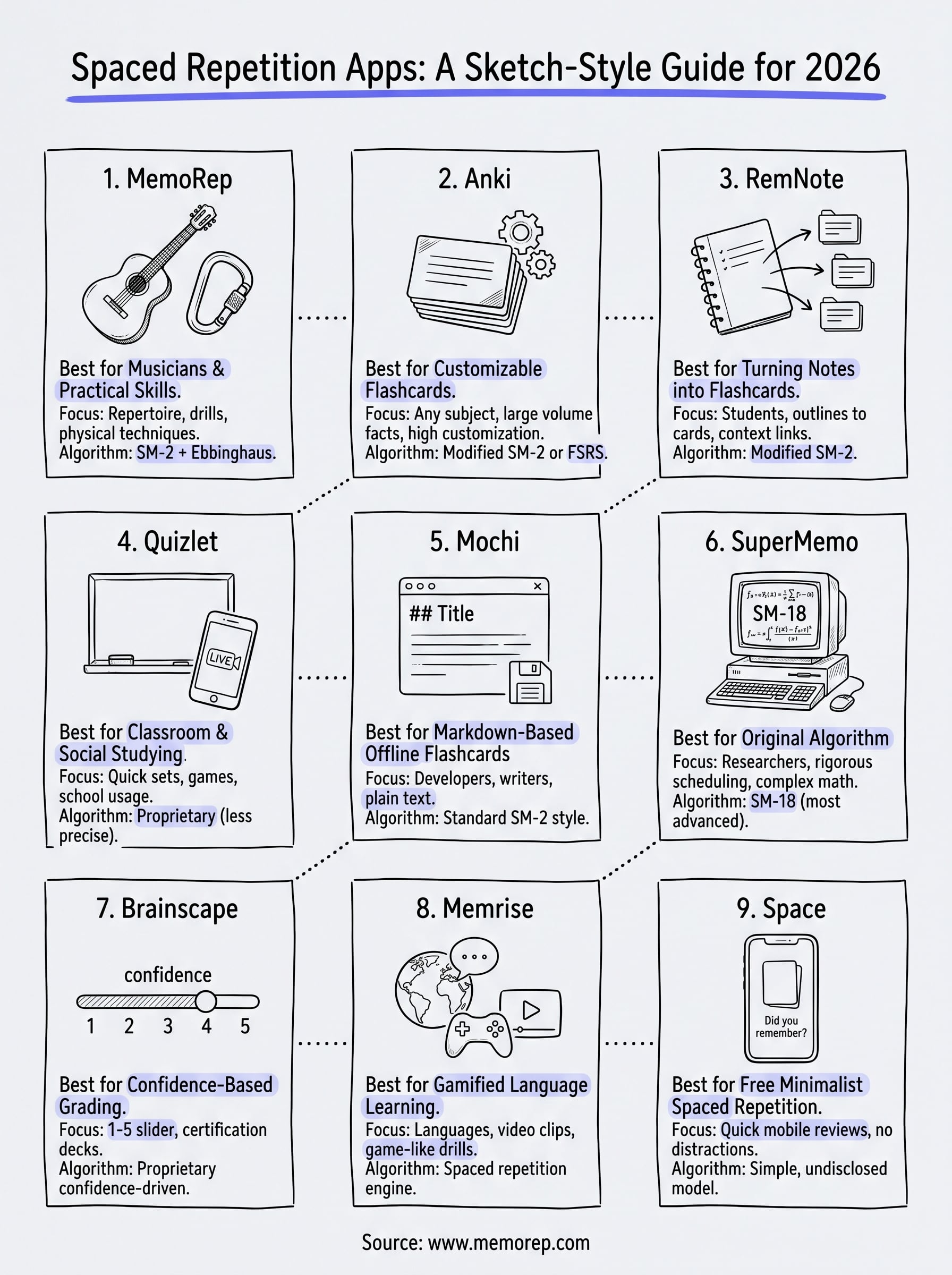
Every app on this list solves the same core problem differently: what to review, and when. Anki rewards tinkerers, RemNote suits note-heavy students, Quizlet fits classrooms, and SuperMemo appeals to anyone chasing algorithmic precision over polish. But if what you're actually trying to hold onto isn't a fact on a card, it's a song, a technique, or a drill you can't afford to let go rusty, none of them were built with you in mind.
That's the gap MemoRep fills. It applies the same spaced repetition science these apps rely on, but points it at practical, physical skills instead of text recall, so your repertoire stays sharp without you managing a spreadsheet on the side. Curious how the scheduling actually works under the hood? See how MemoRep's algorithm works, then grab one of the free beta spots while they're still open.