6 Best Spaced Repetition Reminder Apps to Try
You know the drill: you learn something, life gets busy, and three weeks later the skill or fact has slipped away. That's the whole reason a spaced repetition reminder app exists. Instead of trusting your memory or a messy spreadsheet, these tools track what you've practiced and nudge you right before it fades, based on decades of research into how forgetting actually works.
If you're searching for a spaced repetition scheduling app, you probably want two things: reliable reminders and a scheduling engine smart enough to adjust as you improve. That's exactly what separates a good app from a glorified flashcard box. The best options calculate intervals using review schedules built on proven models like SM-2 and adapt based on your actual performance, not a fixed calendar.
Below, we've rounded up six apps worth trying, comparing how each handles scheduling accuracy and notifications, whether they work well on iOS, and who they're built for, from language learners to musicians managing repertoire and technique. One of them, MemoRep, is built specifically for practical skills rather than text-based flashcards, so you'll see how it stacks up against the more traditional options.
1. MemoRep for musicians and practical skill practice
MemoRep takes a different approach than most spaced repetition tools because it was built for practical skill practice, not text memorization. If you're a musician trying to keep a repertoire fresh, a dancer maintaining choreography, or anyone drilling a physical technique, MemoRep skips the flashcard metaphor entirely and organizes your work into practice cards inside projects, so you always know what to pick up next and when to revisit it.
How it works
Instead of asking you to rate how well you memorized a fact, MemoRep asks how the practice session went. You create a card for each piece, passage, scale, or drill, group related cards into projects, and log a session using an Again/Hard/Good/Easy rating. The platform runs on Ebbinghaus's forgetting-curve research and the SuperMemo SM-2 algorithm to calculate your next optimal session, then sends a reminder so the skill never has time to go rusty.
A practice tool only earns its keep if it tells you exactly what to work on today, not just that something is "due."
Who it's for
MemoRep suits musicians who want to memorize music faster across multiple pieces, teachers managing student repertoire lists, and anyone learning a hands-on skill that needs repeated, deliberate reps rather than passive review. It's a strong pick if you've ever opened a practice session and wasted the first ten minutes deciding what to run through, since the adaptive scheduling makes that call for you. If your goal is vocabulary or exam facts, you'll want one of the flashcard-first tools further down this list.
Pricing
MemoRep is currently in a limited beta, and the first 200 users get free access to the full premium feature set, including progress tracking, notifications, and unlimited projects. You can check current availability and sign up for the MemoRep beta directly on the site. Because the beta group is capped, joining early is the only way to lock in premium access before pricing kicks in for new users.
2. Anki for fully customizable review scheduling
Anki is the granddaddy of spaced repetition apps, and it earns its reputation through raw flexibility. If you want a spaced repetition schedule app you can bend into any shape, from language decks to anatomy diagrams to music theory drills, Anki lets you build it yourself rather than handing you a finished system.
How it works
Every card you review gets rated Again, Hard, Good, or Easy, and Anki's algorithm (a heavily modified version of SM-2) recalculates the next interval on the spot. You can tweak nearly every setting, including starting intervals, ease factors, and daily review limits, which makes it powerful but also genuinely intimidating for a first-time user, and there's a real argument that simplicity wins in memory training.
The more control an app gives you over scheduling, the more setup work it demands before it actually saves you time.
Who it's for
Anki fits self-directed learners who don't mind a learning curve and want granular control over their review scheduling. Medical students, language learners building massive vocabulary decks, and anyone comfortable installing add-ons will get the most value here. If you'd rather practice a physical skill than manage settings menus, this isn't the right fit.
Pricing
Anki is free on desktop and Android, but the official iOS app, AnkiMobile, costs a one-time $24.99. There's no subscription, just that upfront fee if you want it on your iPhone.
3. RemNote for note-based spaced repetition
RemNote blends note-taking with flashcard review, so instead of building a separate deck, you turn your existing notes into reviewable material. It's aimed at students who already outline lectures or textbooks and want spaced repetition layered on top of that work rather than a second system to maintain.
How it works
Studying happens inside a hierarchical document editor where you write notes and mark specific lines as flashcard pairs using simple syntax. RemNote then pulls those marked lines into a review queue and schedules them with a spaced repetition algorithm similar to SM-2, adjusting intervals based on how you rate each answer. Because everything lives in the same workspace, you can jump from a review session back into your original notes for context.
Turning your notes into flashcards only works if the app makes review feel like a five-second step, not a second job.
Who it's for
RemNote suits students and researchers who take dense, structured notes and want an app for spaced repetition reminder needs without rebuilding their material from scratch. It's less useful if you're practicing a physical skill like an instrument, since there's nothing to type your way through, and less appealing if you just want a simple reminder without a full note-taking system attached.
Pricing
RemNote offers a free tier with core note-taking and flashcard features, while the Pro plan runs about $8 per month billed annually, unlocking unlimited PDF uploads, advanced spaced repetition settings, and priority support.
4. Quizlet for casual flashcard review reminders
Quizlet is the app most people already know, and it works well if you want something quick without learning a new system, though a side-by-side look at Anki, Quizlet, and MemoRep shows where it falls short. It leans more toward casual study than serious scheduling accuracy, but its familiarity and huge library of shared decks make it an easy on-ramp for students who just need to cram efficiently.
How it works
You build digital flashcards or search millions of decks other users have already made, then run through them using modes like Learn, Match, or Test. The Learn mode applies a spaced repetition schedule app logic, resurfacing cards you missed more often, though it's less rigorous than SM-2 based tools since it weighs recent performance more than long-term intervals. Reminders come through push notifications tied to your study goals rather than a precise forgetting-curve calculation.
Convenience wins over precision when you just need to pass tomorrow's quiz, not retain something for years.
Who it's for
Quizlet suits students cramming for a test, teachers building class-wide vocabulary sets, and anyone who wants a low-effort app for spaced repetition reminder needs without configuring algorithm settings. It's not built for musicians or skill practitioners since everything revolves around text and image cards, and the scheduling isn't precise enough for long-term retention work.
Pricing
Quizlet's free tier covers deck creation and most study modes with ads. Quizlet Plus costs around $35.99 per year and removes ads while adding offline access, custom images, and more detailed progress stats.
5. Memrise for language vocabulary retention
Memrise built its name on video clips of native speakers paired with vocabulary drills, making it one of the more engaging spaced repetition reminder app options if your goal is a new language rather than a skill or a textbook fact.
How it works
Learning happens through courses that mix multiple-choice, typing, and listening exercises, all wrapped around a spaced repetition engine that resurfaces words as they're about to fade. The app tracks each word's strength and pushes it back into rotation using intervals loosely modeled on SM-2, though Memrise leans more on gamified streaks and daily goals to keep you coming back than on strict algorithmic precision.
A vocabulary app earns loyalty by making review feel like a game, even when the scheduling underneath is doing the real work.
Who it's for
Memrise fits casual and intermediate learners who want native-speaker audio and a bit of gamification alongside their adaptive scheduling, rather than a bare-bones flashcard grid, though you can also learn a language faster with spaced repetition on your own terms. It's a weaker fit if you're after rigorous long-term retention data or if your practice involves anything outside vocabulary and phrases, since there's no way to log a physical drill or a piece of music here.
Pricing
Memrise offers a free tier with limited courses and daily reviews. The Pro subscription runs about $8.49 per month or $59.99 per year, unlocking full course libraries, offline mode, and grammar-focused practice tools.
6. Never Forget for simple iOS review reminders
Never Forget strips spaced repetition down to its bones: no decks, no courses, just a plain list of things you want to remember and a notification when it's time to review them. It's built exclusively for iPhone, which makes it a solid pick if you're hunting for the best spaced repetition app iOS users can set up in minutes rather than an hour of deck configuration.
How it works
Setup takes seconds: you type in an item, whether that's a fact, a habit, or a skill you want to keep sharp, and the app schedules your first review using an SM-2 style interval. Each time a reminder fires, you tap a rating similar to Again or Good, and Never Forget recalculates the next date. There's no card editor, no media attachments, and no syncing across platforms, just a lightweight spaced repetition schedule app that lives entirely in iOS notifications, which is fine given that notifications are the missing link in most memory apps.
Sometimes the most useful tool is the one with the fewest features standing between you and a reminder.
Who it's for
Someone who wants a minimal app for spaced repetition reminder purposes, without flashcards, decks, or a learning curve, will get the most out of Never Forget. It's a poor match if you need Android support, detailed analytics, or a system built for structured practice like music or physical drills.
Pricing
Never Forget is a one-time purchase on the App Store, priced around $4.99, with no subscription or ongoing fees.
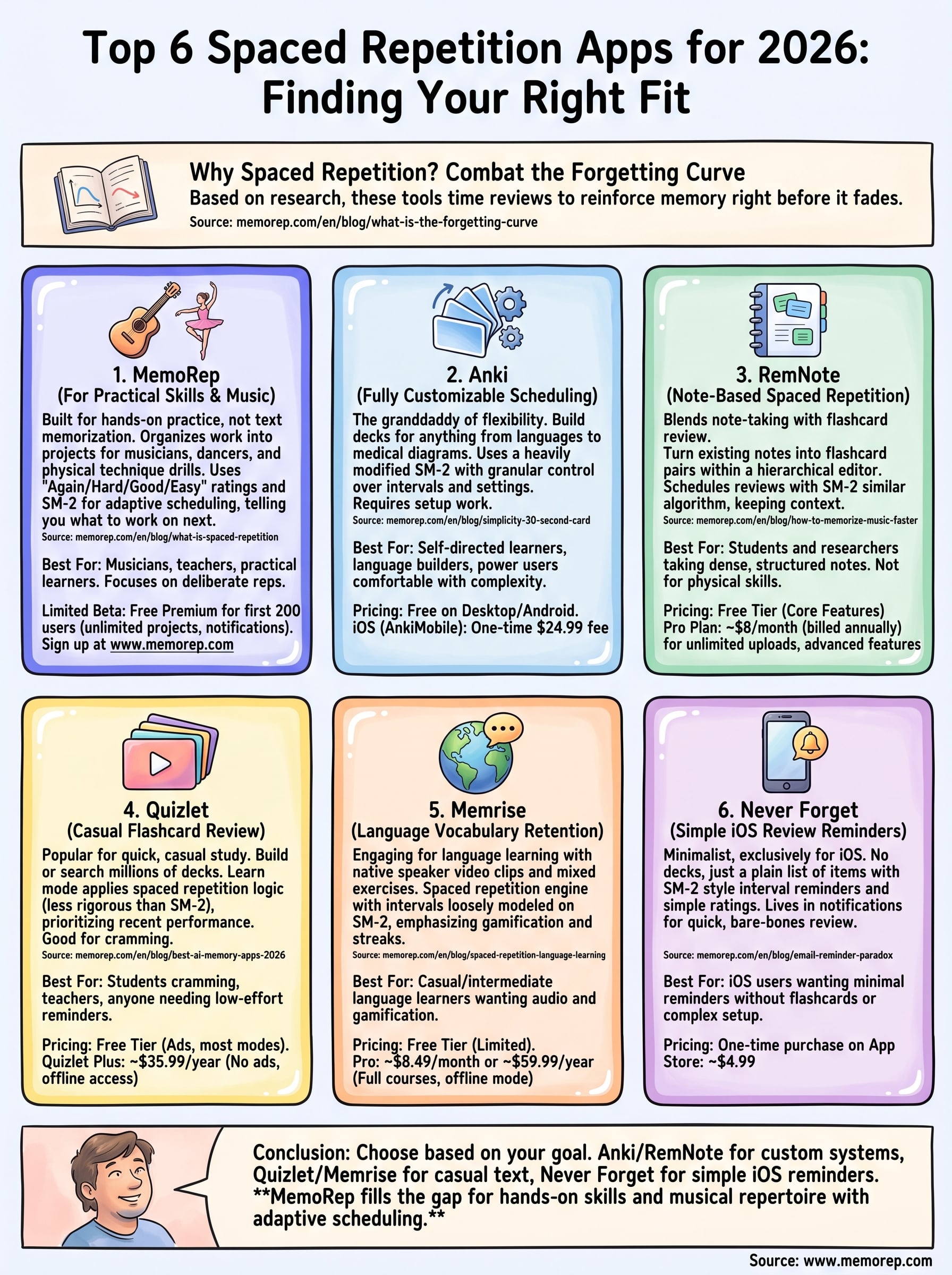
Finding the right fit for your practice
Picking the right tool comes down to what you're actually trying to remember. Anki and RemNote reward learners who don't mind building their own system from scratch, Quizlet and Memrise work well for casual text-based study, and Never Forget covers bare-bones reminders on iOS. None of them, though, were built with a musician's practice session or a physical drill in mind.
That's the gap MemoRep fills. If your practice involves repertoire, technique, or any hands-on skill that needs deliberate, well-timed reps, a generic flashcard app will always feel like a workaround. MemoRep's scheduling engine was designed around that exact problem, telling you what to run through today so you stop guessing and start improving. Curious how the algorithm actually decides your next session? See how MemoRep times your next practice session and claim a free beta spot while they last.