
8 Best Ear Training Software Reviews for Musicians in 2026
Your ear either catches the interval, the chord quality, the chord progression, or it doesn't, and no amount of theory reading fixes that gap. That's why so many musicians go hunting for ear training software reviews before committing money or time to a new app. You want to know which tool actually trains recognition fast, which one gets abandoned after a week, and which interface makes daily drills feel like a chore instead of a habit.
This article answers that directly. We tested and compared the apps musicians actually use in 2026, weighing interval and chord recognition accuracy against how each program adapts to your skill level over time. You'll get a clear picture of pricing, mobile support, and exercise variety, so you can pick software that matches your instrument, your goals, and your budget without wasting a free trial finding out the hard way.
Below you'll find eight tools ranked by real usability, not marketing copy. We also flag where a structured practice schedule matters as much as the software itself, since even the sharpest ear training app only works if you revisit exercises at the right intervals instead of cramming sporadically and losing progress between sessions.
1. EarMaster: comprehensive training for schools and serious students
EarMaster has been around since the late 1990s, and that longevity shows in how thorough the curriculum feels. If you've read other ear training software reviews, you've probably seen it mentioned as the standard against which newer apps get measured, and that reputation is mostly earned. It covers intervals, chords, scales, rhythm dictation, and chord progressions in a single structured course rather than a loose bundle of drills.
How it works
Starting with EarMaster means working through a graded course structure that moves from basic interval recognition to advanced harmonic dictation. Each lesson locks a skill-based curriculum in place before unlocking the next, so you can't skip ahead into chord inversions before you've nailed simple major and minor triads. The software listens to your responses, tracks accuracy per exercise type, and adjusts difficulty automatically, which mirrors the adaptive logic behind spaced repetition software even though EarMaster doesn't call it that explicitly. Rhythm dictation exercises ask you to tap back what you hear, and melodic dictation has you notate short phrases directly in the app.
Key features
EarMaster packs in more exercise types than most competitors on this list, which is why schools and conservatories use it in group settings.
- Interval, chord, and scale recognition across dozens of configurable exercise sets
- Melodic and rhythmic dictation with staff notation input
- Chord progression training, including functional harmony drills
- Sight-singing exercises with pitch detection through your microphone
- Custom exercise builder for teachers assigning specific drills to students
- Progress statistics broken down by skill category
A tool that covers this many skill categories only pays off if you actually revisit each one on schedule, not just when you remember to, and that is exactly where spacing your practice sessions pays off.
Who it's for
Serious students and institutions get the most out of EarMaster because the depth of the curriculum rewards long-term, disciplined use. Teachers running a classroom or a private studio appreciate the ability to assign specific exercise sets and check student progress remotely. Casual learners who just want quick interval drills before a jam session might find the interface more academic than they need, closer to a semester-long theory class than a five-minute warm-up app.
Pricing
EarMaster sells through a mix of one-time licenses and subscription options depending on the platform, and institutional pricing scales for classrooms.
| Plan | Price | Best for |
|---|---|---|
| Free trial | $0 (limited exercises) | Testing the interface before buying |
| Individual license | Around $69 one-time (desktop) | Long-term personal use |
| Mobile app | Around $9.99 (iOS/Android) | Practicing on the go |
| School/institutional license | Custom pricing | Classrooms and ensembles |
One caveat worth flagging: EarMaster's depth comes with a learning curve. If you want a full curriculum and don't mind a slightly dated interface, it delivers. If you'd rather have something lighter that still tracks what needs review, pairing quick daily drills with a structured review schedule in a tool like MemoRep keeps the material EarMaster teaches from slipping through the cracks between sessions.
2. Sonofield: feeling-based training for melodies and singers
Sonofield takes a different approach than most software you'll find in ear training software reviews, focusing on how melodies feel rather than drilling isolated intervals in a vacuum. Instead of asking you to name a major third out of context, it trains you to recognize melodic shapes and tendencies the way singers and songwriters actually hear them, through contour and emotional pull rather than pure math.
How it works
Unlike interval-drill apps that isolate two notes at a time, Sonofield builds exercises around short melodic fragments and asks you to internalize how each note resolves within a key. Practicing here means singing back phrases, identifying scale degrees by their pull toward the tonic, and gradually building a relative pitch foundation rather than memorizing frequency ratios. The app leans on call-and-response drills, so you hear a phrase, sing or hum it back, and get feedback on pitch accuracy through your device's microphone.
Key features
Sonofield's feature set centers on musicality rather than raw interval-naming speed:
- Melodic dictation built around scale-degree feeling, not abstract labels
- Singing-based feedback using microphone pitch detection
- Contour recognition drills for melodic shape and direction
- Key-centered exercises that reinforce tonal context over isolated tones
Training your ear to feel where a melody wants to go matters more for singers than naming intervals correctly on a worksheet.
Who it's for
Vocalists, songwriters, and improvising musicians get the most value here, since the app trains the kind of intuitive hearing that helps you find a harmony line or transcribe a melody by feel. Instrumentalists chasing conservatory-level interval speed will likely find EarMaster or Complete Ear Trainer more direct.
Pricing
Sonofield offers a free tier with limited daily exercises, plus a subscription around $6.99/month or $49.99/year for full access to all melodic and singing drills, making it one of the more affordable options on this list for singers specifically.
3. ToneGym: browser-based training with games and community
ToneGym takes the gamification route, turning interval and chord drills into scored challenges you can compare against other players. If you've skimmed ear training software reviews looking for something that feels less like a drill sergeant and more like a game night, this is the one that keeps coming up. It runs entirely in your browser, so there's nothing to install before you can start a session.
How it works
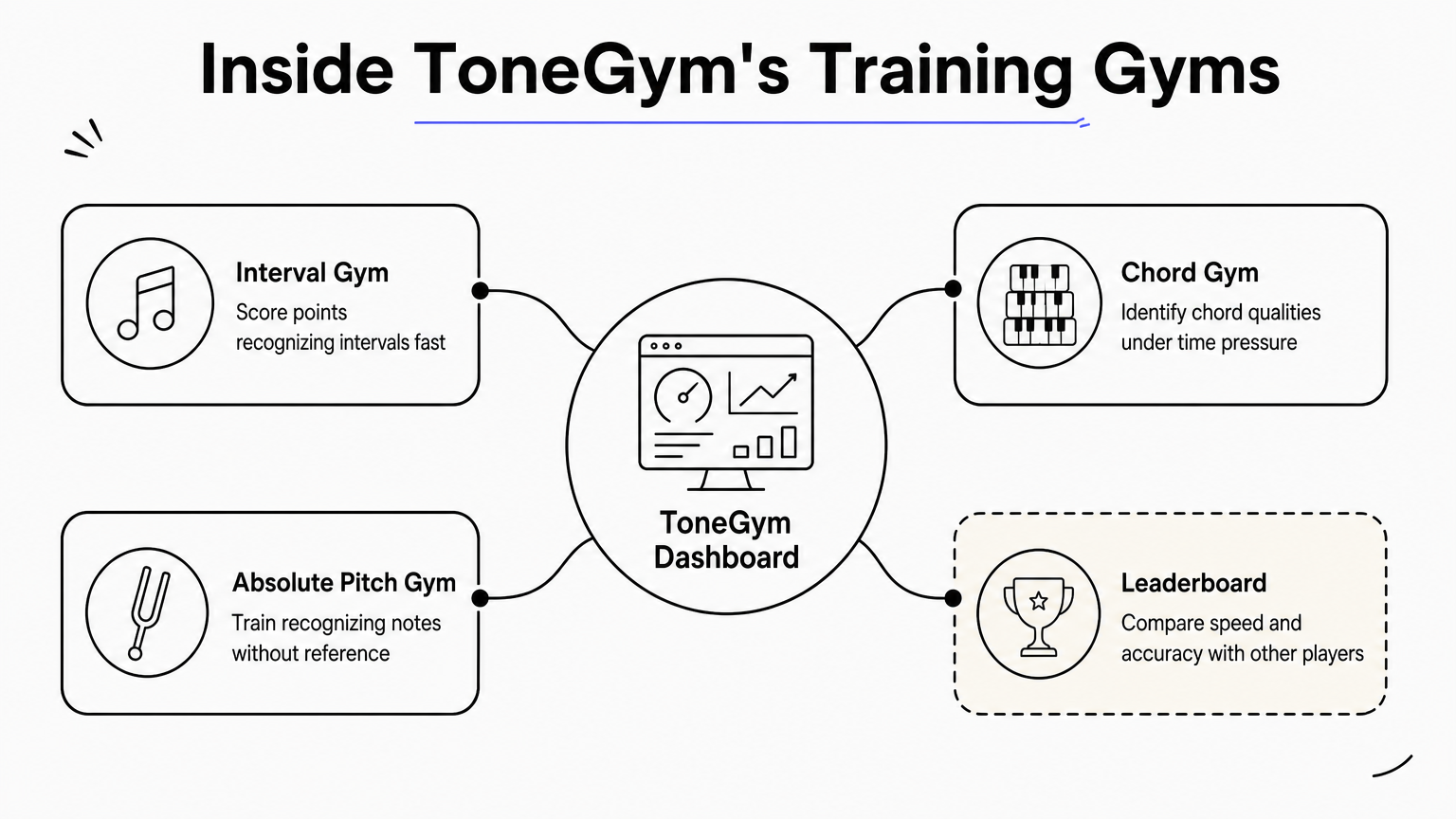
Opening ToneGym drops you into a dashboard of separate "gyms," each targeting a specific skill: intervals, chords, scales, rhythm, and absolute pitch among them. Progress in each gym unlocks harder levels, and a leaderboard tracks your speed and accuracy against the wider ToneGym community. The gamified scoring system rewards both correct answers and response time, which pushes you toward quicker recognition instead of slow, deliberate guessing.
Key features
ToneGym's structure leans hard into competition and variety, which keeps repetitive drilling from feeling stale.
- Multiple training gyms covering intervals, chords, scales, and rhythm separately
- Global leaderboards and weekly challenges for competitive motivation
- Absolute pitch training module, uncommon among apps on this list
- Community forums where users share practice strategies
Competing against a leaderboard can push your recognition speed further than any solo drill session will.
Who it's for
Competitive learners and musicians who stay motivated by rankings and streaks will get the most mileage out of ToneGym. Students who practice better in isolation, without the pressure of a scoreboard, might find the community angle more distracting than helpful. It also suits anyone who wants browser-based ear training software without downloading a dedicated app on every device they use.
Pricing
ToneGym offers a free tier with limited daily exercises across each gym, plus a premium subscription around $9.99/month or $79.99/year that unlocks unlimited practice, all gyms, and detailed statistics. Given how much of the value depends on daily streaks, pairing it with a spaced repetition scheduler like MemoRep helps make sure you're revisiting weak spots on schedule instead of only logging in when the leaderboard nags you, and it's worth seeing how other apps for tracking practice streaks compare.
4. Complete Ear Trainer: customizable drills for intervals and chords
Complete Ear Trainer strips away the games and courses you saw in ToneGym and Sonofield, giving you a bare-bones drill generator instead. Reading through ear training software reviews, you'll notice this one gets recommended specifically because it lets you configure exercises down to the individual interval or chord type, rather than forcing you through a fixed curriculum. It's built for musicians who already know what they need to practice and just want a fast, no-frills way to drill it.
How it works
Setting up a session in Complete Ear Trainer means picking exactly which intervals, chord qualities, or scale degrees you want tested, then letting the app generate randomized questions from that pool. Answers come through a simple multiple-choice interface, and the app tracks your accuracy per category so you can see which specific intervals or chords are dragging down your score. There's no story mode, no leaderboard, just a configurable drill engine you can tune to whatever gap you're trying to close this week.
Key features
The app's strength is granular control over exercise content:
- Custom interval and chord selection, down to individual quality types
- Adjustable difficulty settings for tempo, register, and instrument timbre
- Per-category accuracy tracking to pinpoint weak spots
- Absolute pitch and chord inversion drills available as optional modules
The more precisely you can target a weak interval, the faster you close the gap, and it helps to pair that with a step-by-step method for hearing intervals, since Complete Ear Trainer is built entirely around that principle.
Who it's for
Intermediate and advanced musicians who already understand music theory and want targeted repetition will get the most out of this app. Beginners looking for guided structure should start with EarMaster or Functional Ear Trainer instead, since Complete Ear Trainer assumes you already know what to practice.
Pricing
| Plan | Price | Best for |
|---|---|---|
| Free version | $0 (ads, limited modules) | Trying core drills |
| Pro upgrade | Around $4.99 one-time | Removing ads, unlocking all modules |
Given how narrowly focused each session is, logging results in a spaced repetition tool like MemoRep helps you remember which intervals actually need another round next week.
5. Functional Ear Trainer: classic scale-degree recognition practice
Functional Ear Trainer strips ear training down to one core skill: hearing scale degrees within a key rather than isolated intervals floating in space. Anyone comparing ear training software reviews for solfege-based practice runs into this app quickly, since it's built specifically around movable-do thinking, the method most classical theory teachers push students toward before anything else. There's no dictation, no chord progressions, just relentless repetition of scale-degree recognition until it becomes automatic.
How it works
Each session plays a tonic reference, then a random scale degree, and asks you to identify it by number or solfege syllable. Correct answers speed up the pace slightly; wrong answers slow things down and repeat similar degrees more often. This scale-degree recognition loop is the entire app, no menus to dig through, no unlockable levels, just a single focused drill you can run in under five minutes.
Key features
Functional Ear Trainer keeps its feature list narrow on purpose, which is exactly why some musicians prefer it over broader platforms.
- Movable-do and fixed-do modes for different theory backgrounds
- Adjustable tonic reference and playback speed
- Minor key variations, including harmonic and melodic minor scale degrees
- Simple accuracy tracking across sessions
A single, sharply focused drill often builds recognition faster than a feature-packed app that spreads your attention thin.
Who it's for
Singers, sight-readers working through reading drills at the staff, and anyone training functional hearing for improvisation or transcription will find this app does exactly what they need without distraction. Musicians who want chord or rhythm training alongside scale degrees should look at EarMaster or ToneGym instead, since Functional Ear Trainer never expands beyond its one job.
Pricing
Functional Ear Trainer is free on Android and iOS with no ads and no in-app purchases, making it one of the cheapest entries on this list. Because the drill resets each session without tracking long-term retention, logging your weak scale degrees in MemoRep gives the practice a schedule the app itself doesn't provide.
6. Chet: a free app with real music examples
Chet breaks from the synthesized-tone drills you get in most of these apps and trains your ear on actual recordings instead, pulling snippets from jazz, pop, and classical tracks. Musicians tired of recognizing a perfect fifth played on a generic piano patch but freezing when it shows up in a real song often land on this app through ear training software reviews that praise it for closing that exact gap. It's also completely free, which is rare among the tools on this list that go beyond a single narrow drill.
How it works
Starting a Chet session means listening to a short clip from a real recording, then identifying the interval, chord, or progression embedded in that passage. The app pulls from a growing library of licensed music examples rather than generating tones from scratch, so your ear learns to recognize harmonic content inside actual instrumentation, reverb, and mix texture. This real-world listening context matters because concert halls and recording studios never sound like a clean sine wave, and plenty of musicians can ace app drills but still miss an interval buried in a busy arrangement.
Key features
Chet keeps its exercise types focused but distinct from anything synthesized:
- Real recording excerpts instead of generated tones for every drill
- Genre variety, spanning jazz, pop, and classical source material
- Interval and chord recognition trained specifically in musical context
- Difficulty scaling based on excerpt complexity and instrumentation
Recognizing an interval on a clean tone means little if you can't hear the same interval buried inside a real mix.
Who it's for
Gigging musicians, transcribers, and anyone who studies recordings by ear will get the most direct payoff from Chet, since the whole point is training recognition in conditions that match actual listening. Beginners who haven't nailed basic interval identification on clean tones yet should start with Functional Ear Trainer or EarMaster before moving to Chet's messier, more realistic examples.
Pricing
Chet is free to download and use on iOS and Android, with no premium tier or in-app purchases as of this writing. Since the app doesn't schedule review sessions on its own, pairing it with an app that reminds you when reviews are due helps you track which real-world examples you keep missing and resurface them before the recognition fades.
7. Perfect Ear: a budget-friendly all-in-one trainer
Perfect Ear crams intervals, chords, scales, and rhythm drills into one app without charging much for the privilege. Anyone scanning ear training software reviews on a tight budget tends to land here fast, since it covers nearly as much ground as EarMaster at a fraction of the cost. It won't win design awards, but the exercise library is deep enough to keep an intermediate student busy for years.
How it works
Each exercise category in Perfect Ear runs independently, so you jump between intervals, chords, scales, or rhythm without moving through a locked curriculum. You configure difficulty manually, choosing which intervals or chord types to include, then the app plays randomized examples and scores your answers. A customizable exercise generator sits at the core of every module, closer in spirit to Complete Ear Trainer than to EarMaster's structured lesson path, though Perfect Ear covers more ground per module than most single-purpose apps on this list.
Key features
Perfect Ear's feature list is long for the price point:
- Interval, chord, and scale recognition across major, minor, and modal contexts
- Rhythm dictation and reading exercises alongside pitch-based drills
- Chord progression and inversion training for harmonic context
- MIDI keyboard support for practicing with a real instrument connected
- Statistics tracking per exercise category
Getting near-conservatory exercise variety for a few dollars is rare, and Perfect Ear is one of the few apps that pulls it off.
Who it's for
Budget-conscious students who want breadth without paying EarMaster's institutional prices will find Perfect Ear covers most of the same categories. Musicians who want polish, guided lesson sequencing, or teacher-assigned coursework should look elsewhere, since the interface feels more utilitarian than curated.
Pricing
Perfect Ear offers a free version with ads and limited exercises, plus a paid unlock around $5.99 that removes ads and opens every module. Because nothing here schedules your review sessions, running weak categories through a tool built on spaced repetition scheduling algorithms keeps Perfect Ear's low cost from turning into wasted practice time.
8. Tenuto: quick theory and ear training reps for iOS
Tenuto, made by musictheory.net, treats ear training as one module among several quick theory drills rather than the whole point of the app. If you've read enough ear training software reviews to notice a pattern, Tenuto stands out because it pairs interval and chord recognition with note reading, key signatures, and scale spelling in the same compact package. It's built for short, frequent reps rather than long practice sessions, which suits musicians squeezing drills between other commitments.
How it works
Opening Tenuto gives you a grid of independent exercise types, and you tap into whichever one you want without navigating a locked course structure. Each drill plays or displays a prompt, you answer through simple taps, and the app scores you instantly with running accuracy stats. The modular exercise selection means you can knock out five minutes of interval training and five minutes of key signature drills in the same sitting without switching apps.
Key features
Tenuto's value comes from breadth packed into a small, fast interface:
- Interval and chord ear training alongside visual theory drills
- Customizable exercise settings for range, instrument sound, and difficulty
- Scale, key signature, and note-reading modules bundled in the same app
- Offline functionality, no account or internet connection required
Short, frequent reps on a phone often build more consistency than a single long session you keep postponing.
Who it's for
Students studying for theory exams, band and orchestra members warming up before rehearsal, and anyone who wants ear training bundled with note-reading practice will get solid value here, though apps focused purely on music theory go deeper on the written side. Musicians wanting deep harmonic dictation or sight-singing should look at EarMaster instead, since Tenuto's ear drills stay intentionally basic.
Pricing
Tenuto costs a one-time $3.99 on iOS, with no subscription and no ads. Since the app doesn't track long-term retention or flag which intervals you keep missing, feeding your results into MemoRep's scheduling keeps those quick reps from fading a week later.
Finding the app that fits your ear
No single app on this list wins every category, and that's the point. EarMaster suits students who want a full curriculum, Chet trains your ear on real recordings instead of clean tones, and Tenuto fits musicians who only have five minutes between other commitments. Pick based on your instrument, your budget, and whether you learn better through games, guided lessons, or bare-bones drills, and if you want coverage beyond the ear, compare the broader music learning apps for theory, notes, and rhythm.
Whatever app you choose, the software only teaches recognition once. Keeping that skill sharp means revisiting weak intervals and chords before they fade, which none of these apps handle well on their own. That's the gap a spaced repetition scheduler closes, turning scattered practice into a routine that actually sticks. If you want to see exactly how that scheduling works before committing your practice time to it, see how MemoRep decides when to resurface each interval and put your ear training on a system that remembers what your app doesn't.